Top donors report
In short: Open Reports, then Top donors under the Donors panel. The report ranks your donors by total given over the period you pick with the date range picker (top right). It defaults to Lifetime. You need the View Reports permission.
Overview
The Top Donors report shows who your largest supporters are and how their ranking has changed over time. The page is titled Top Donors. Each donor is ranked by total given in the period, with their share of all giving, number of gifts, average gift, first and last gift dates, and a rank-change arrow against a comparison period.
Before you start
You'll need:
- The View Reports permission.
Running the report
Step 1: Open the report
Open Reports from the main navigation, then click Top donors in the Donors panel.
Step 2: Choose the period
Use the date range picker at the top right. The default is Lifetime — from 1 January five years before the current year, up to today.
Step 3: Set filters and apply
Set any sidebar filters (see Field reference) and click Apply Filters.
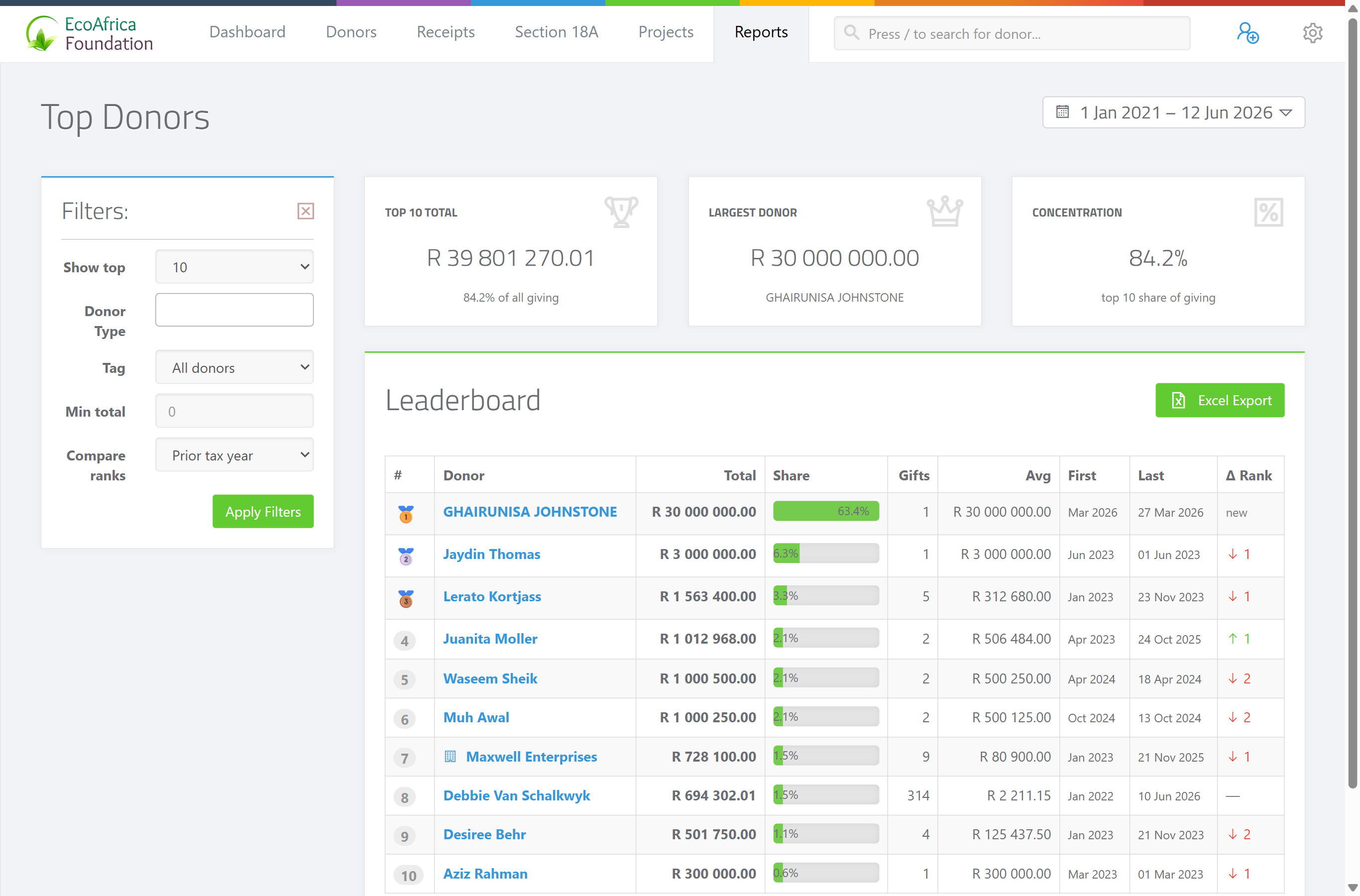
The summary cards
Three cards appear above the table:
- Top 10 Total — the combined giving of the ten largest donors in the period.
- Largest Donor — the single biggest donor and their total.
- Concentration — the share of all giving that comes from your top donors (how reliant you are on a few large supporters).
The results table
One row per donor, ranked from highest total downwards, with these columns:
- # — the rank position.
- Donor — the donor's name (with their tags shown beneath).
- Total — the total given in the period.
- Share — that donor's percentage of all giving in the period.
- Gifts — the number of receipts.
- Avg — the average gift size.
- First — the date of their first gift.
- Last — the date of their most recent gift.
- Δ Rank — how their rank has moved versus the comparison period (set by the Compare ranks filter). An up or down arrow shows whether they have climbed or fallen.
If no donors match the filters, the page shows: "🏆 No donors meet the filters."
Exporting to Excel
Use the Excel export on the page to download the ranked list as a spreadsheet. The file downloads as ad_top_donors_report_<date>.xlsx.
What "Lifetime" means
The default Lifetime range starts on 1 January, five calendar years ago (for example, on 10 May 2026 it starts at 1 Jan 2021) and runs to today. It is not literally every receipt ever — pick a custom range if you need a different window.
Field reference
| Filter | Where | Values |
|---|---|---|
| Show top | Sidebar | 10 (default), 25, 50 or 100 donors. |
| Donor Type | Sidebar | Individual, Company, Company (Public), CC, NPC, Trust, Association, Estate. Leave blank for all. |
| Tag | Sidebar | Limit the ranking to donors with a particular tag. |
| Min total | Sidebar | Only include donors whose total in the period is at least this amount. |
| Compare ranks | Sidebar | "Prior tax year" (default), "Prior 12 months" or "None". Drives the Δ Rank column. |
| Date range | Top right | Defaults to Lifetime (from 1 January five years ago to today). |
Common issues & solutions
| What you see | What it means | How to fix it |
|---|---|---|
| "🏆 No donors meet the filters." | No donor matched your filters in the period (often a Min total that's too high, or a tag with no givers). | Lower Min total, clear the Tag filter, or widen the date range. |
| The Δ Rank column is empty. | Compare ranks is set to "None", or the donor had no giving in the comparison period. | Set Compare ranks to "Prior tax year" or "Prior 12 months". |
| The Excel export hovers/spins and won't download. | The export is still building, or the page lost its connection. | Wait a few seconds; if it doesn't finish, refresh and try again. If it keeps failing, contact support. |
FAQ
Who are my biggest donors? Open Top donors. It ranks donors by total given, with the largest at the top.
What does the arrow in the Δ Rank column mean? It shows whether a donor climbed or fell compared with the period set in Compare ranks (prior tax year or prior 12 months).
Can I export the top donors to Excel?
Yes — use the Excel export. The file downloads as ad_top_donors_report_<date>.xlsx.
What does Concentration tell me? It's the share of all your giving that comes from your top donors — a high number means you rely heavily on a few large supporters.