Donor information report
In short: Open Reports, choose the Donor information report, pick what to look for with the missing info filter, and the report lists the matching donors. You can export them to Excel or email them all a personalised request to update their own details.
Overview
The Donor information report (also called the missing-info report) finds donors who are missing details you need — an email, a phone number, an address, a post code, a registration number or a tax number. It's the quickest way to spot which donors you must chase before you can issue valid Section 18A certificates. From the report you can export the list to Excel, or send every listed donor a personalised update request in one go.
Before you start
You'll need:
- The View Reports permission.
The report never includes the built-in Anonymous donor.
Running the report
Step 1: Open the report
Open Reports from the top navigation bar and choose the Donor information report.
Step 2: Choose what to look for
Set the missing info filter to one of:
- email — donors with no email address.
- phone — donors with no phone number.
- address — donors with no street address.
- post code — donors with no post code.
- reg_no — donors with no ID or registration number.
- tax_no — donors with no SARS tax number.
- info — donors missing any of the above (the default).
- all — every donor, with no missing-info filtering.
Step 3: Apply optional filters
- Filter by Section 18A requirement: Yes for only donors who require a certificate, No for those who don't.
- Filter by a tax year so the report only counts donors who gave in that year. Leave it as all for every donor.
Step 4: Read the results
The report lists the matching donors, and shows how many donors match the missing-info criteria and how many already have the relevant information.
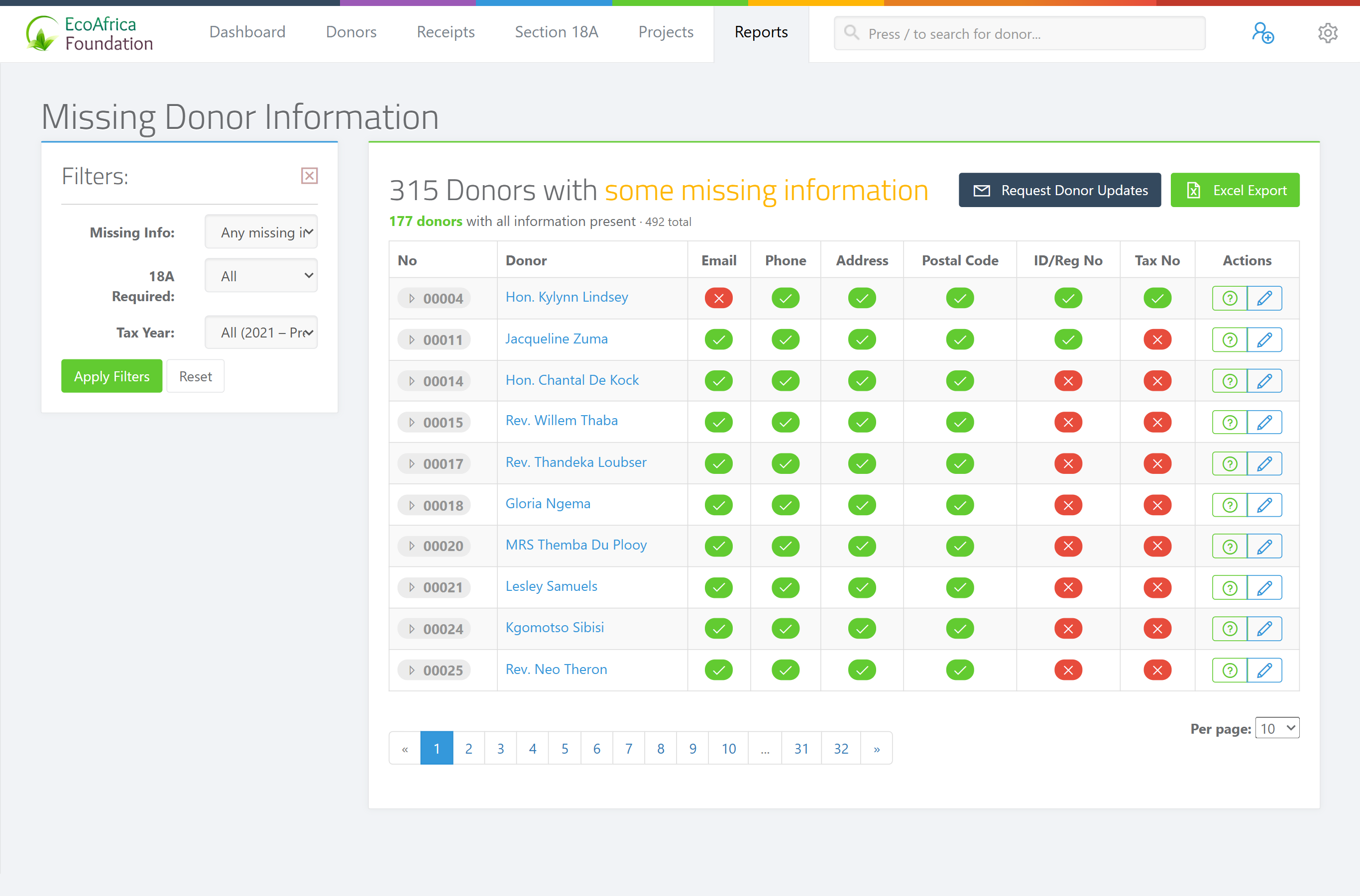
Exporting the report
Click the export button to download the results as an Excel spreadsheet. The file is named ad_donor_missing_info_report_ followed by the date and time.
Emailing the listed donors a request
From this report you can send every listed donor a personalised request to update their own details. ActiveDonor:
- Only emails donors who have an email address on file and whose address is not on the bounce or complaint suppression list.
- Skips any donor who was already emailed an info request in the last 7 days.
- Sends at roughly 450 emails per hour and gives each donor a 7-day update link.
See Requesting updated information from a donor (which covers the personal update link) and Reviewing and merging donor-submitted updates (where you save what donors send back).
What this does not do
- It does not include the Anonymous donor — that record is always excluded.
- It does not change any donor data; it only lists donors and lets you export or email them.
- The email filter lists donors with no email — it does not list donors who have one. The same applies to each missing-info option.
Field reference
| Filter | Options | Default |
|---|---|---|
| Missing info | email, phone, address, post code, reg_no, tax_no, info, all | info |
| Section 18A requirement | Yes, No | (none) |
| Tax year | all, or a specific tax year | all |
Common issues & solutions
| What you see | What it means | How to fix it |
|---|---|---|
| A donor I expected is missing from the list | The missing-info filter only lists donors missing that detail (e.g. email lists donors with no email). | Switch the filter, or use all to list every donor. The Anonymous donor is always excluded. |
| The tax-year filter removed donors | A tax year limits the report to donors who gave in that year. | Set the tax year to all to include everyone. |
| Some donors were not emailed the request | Donors with no email, a suppressed (bounced/complaint) email, or who were emailed in the last 7 days are skipped. | Add or fix their email, or wait until the 7-day cooldown passes. |
FAQ
How do I find donors missing a tax number or registration number? Run the Donor information report and set the missing-info filter to tax_no or reg_no.
How do I export the donor list to Excel?
Click the export button on the report; you'll get a file named ad_donor_missing_info_report_ plus the date and time.
How do I email everyone who's missing details? Use the email-request action on the report. It sends a personalised update link to each listed donor with an email, skipping suppressed addresses and anyone emailed in the last 7 days, at about 450 emails per hour.
Why isn't the Anonymous donor in the report? The Anonymous donor is always excluded from this report.
Related
- Requesting updated information from a donor
- Reviewing and merging donor-submitted updates
- Adding tax and ID information to a donor
- Donor history report
Need a hand?
If the report isn't showing the donors you expect, check the missing-info and tax-year filters first; if it still looks wrong, contact ActiveDonor support with the filter you used.