Receipts report
In short: Open Reports, then Receipts under the Donations panel. The report lists individual receipts over the date range you pick (top right), with filters to narrow down to exactly the receipts you want, and an Excel export. It defaults to the last 30 days. You need the View Reports permission.
Overview
The Receipts Report is the detailed line-by-line list of receipts. The page is titled Receipts Report. Use the sidebar filters to narrow by project, method, type, donor type, tags, amount, receipt-number range and whether a Section 18A certificate was requested or issued. The report remembers your chosen date range during your login session.
Before you start
You'll need:
- The View Reports permission.
Running the report
Step 1: Open the report
Open Reports from the main navigation, then click Receipts in the Donations panel.
Step 2: Choose the date range
Set the date range with the date range picker at the top right (see Field reference for the named ranges). The default is the last 30 days.
Step 3: Set filters and submit
Apply any sidebar filters (see Field reference) and submit.
Step 4: Export if needed
To download the filtered list as a spreadsheet, click the Excel Export button above the table. The file downloads as ad_receipt_report_<date>.xlsx.
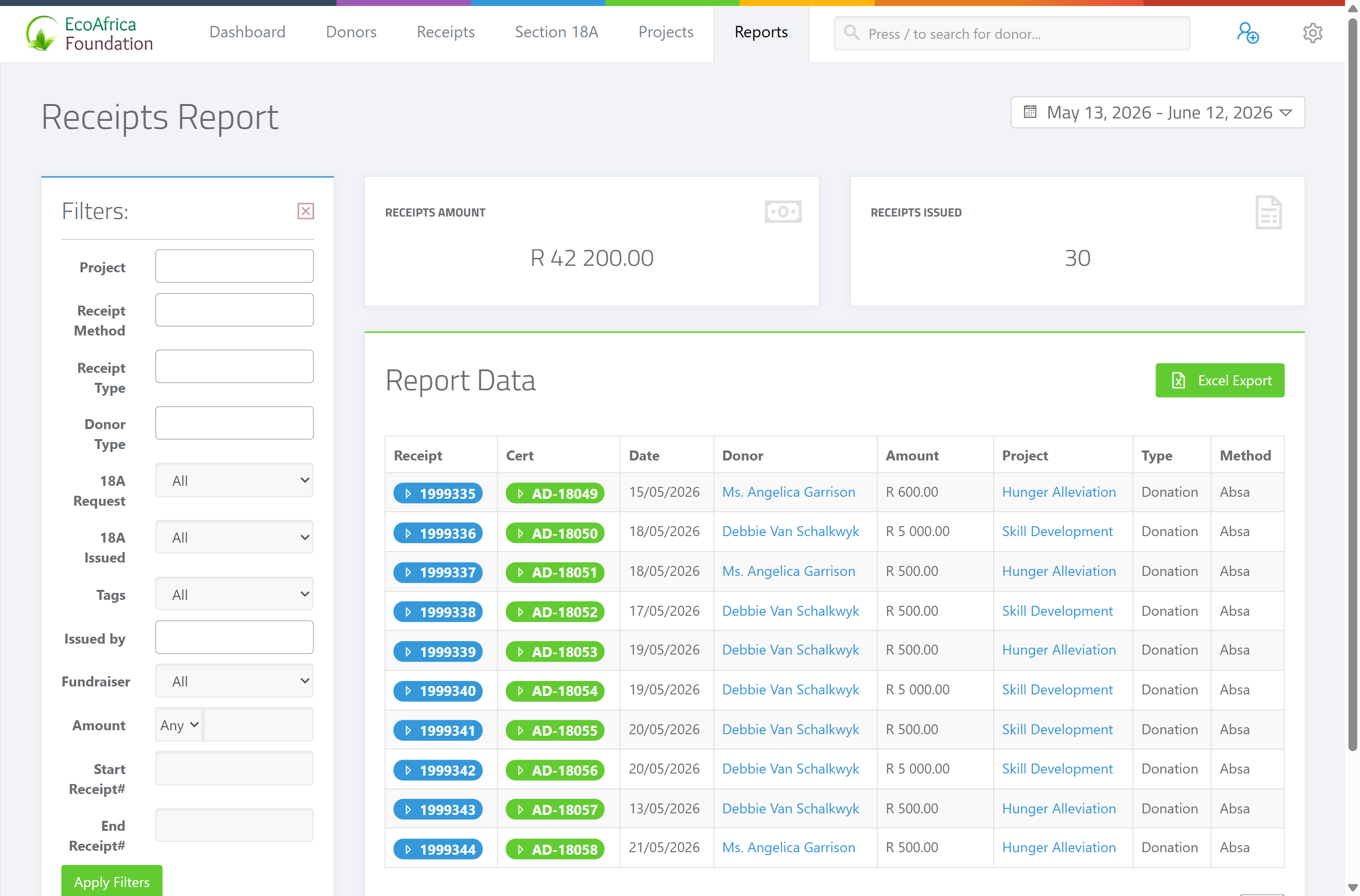
The summary cards
Two figures appear above the table:
- Receipts Amount — the total value of the receipts in the filtered range.
- Receipts Issued — the number of receipts in the filtered range.
The results table
One row per receipt, with these columns:
- Receipt — the receipt number (links to the receipt).
- Cert — whether a Section 18A certificate is linked.
- Date — the date the receipt was received.
- Donor — the donor's name.
- Amount — the receipt amount.
- Project — the project the receipt is allocated to.
- Type — the receipt type.
- Method — the payment method.
If nothing matches, the page shows: "🧾 No receipts found."
Field reference
| Filter | Values |
|---|---|
| Project | One or more projects. |
| Receipt Method | One or more payment methods. |
| Receipt Type | One or more receipt types. |
| Donor Type | Individual, Company, Company (Public), CC, NPC, Trust, Association, Estate, plus "Entity" (any non-individual organisation type). |
| 18A Request | "All", "Requested" or "Not Requested" — whether the donor asked for a Section 18A certificate. |
| 18A Issued | "All", "Issued" or "Not Issued" — whether a certificate has been produced. |
| Tags | One or more donor tags. |
| Issued by | The user who issued the receipt. |
| Fundraiser | The fundraiser linked to the receipt. |
| Amount | "Any", or a comparison (greater than / equal to / less than) plus a value. |
| Start Receipt# | The first receipt number in a range. |
| End Receipt# | The last receipt number in a range. |
| Date range (top right) | Today, Yesterday, Last 7 Days, Last 30 Days (default), This Month, Last Month, Last 3 Months, Year to Date. |
Common issues & solutions
| What you see | What it means | How to fix it |
|---|---|---|
| "🧾 No receipts found." | No receipts matched the filters and date range. | Widen the date range or clear some filters. |
| The date range reset itself. | The report stores your selected range only for your current login session. | Re-select the range; it returns to the last-30-days default in a fresh session. |
| The Excel export hovers/spins and won't download. | The export is still building, or the page lost its connection. | Wait a few seconds; if it doesn't finish, refresh and try again. If it keeps failing, contact support. |
FAQ
How do I get a list of receipts for a date range? Open Receipts, set the date range at the top right, apply any filters and submit.
How do I find receipts that still need an 18A certificate? Set 18A Request to "Requested" and 18A Issued to "Not Issued". (Note: a dedicated view of donors awaiting certificates lives under 18A Management — see Batch and combined Section 18A certificates.)
Can I export receipts to Excel?
Yes — click Excel Export above the table. The file downloads as ad_receipt_report_<date>.xlsx.
Why did my date range go back to the last 30 days? The chosen range is kept for your current login session only. It resets to the default in a new session.