Getting help and training
In short: Open Help & Training from the top-bar gear menu to search the knowledge base, start a live chat, book a training session, contact ActiveDonor by phone or email, and switch on support access. The page is at the /help address.
Overview
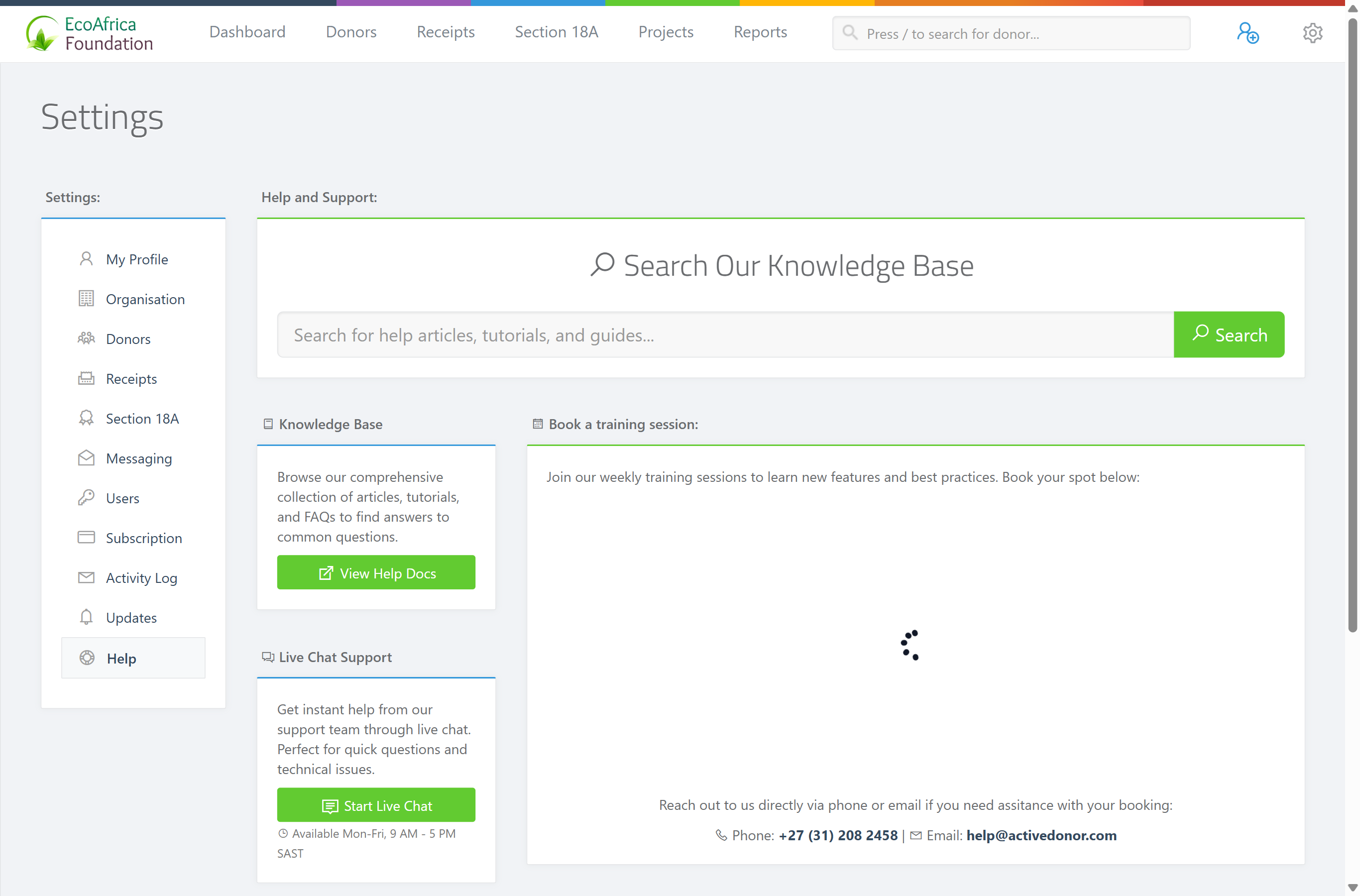
The Help & Training page gathers all the ways to get support in one place. From here you can search the knowledge base, open a live chat with the support team, book a training session, reach ActiveDonor by phone or email, and grant support access so the team can help inside your account.
Opening the Help page
- In the top navigation bar, open the gear / cog dropdown (far right).
- Select Help & Training. The "Help and Support:" page opens, with the Settings navigation on the left.
Searching the knowledge base
At the top of the page is a "Search Our Knowledge Base" box.
- Type your question (a feature name or an error message) into the search field.
- Select Search.
- The ActiveDonor help site (
help.activedonor.com) opens in a new tab with your results.
You can also browse all the documentation directly: the Knowledge Base panel has a View Help Docs button that opens help.activedonor.com in a new tab.
Live chat support
The Live Chat Support panel connects you to the support team for quick questions.
- Select Start Live Chat.
- The chat window opens in the corner of the screen.
📌 Note: Live chat is staffed Mon-Fri, 9 AM - 5 PM SAST. The live-chat button is also available throughout the app (bottom-right corner), not only on the Help page.
Booking a training session
The Book a training session: panel embeds a booking calendar for ActiveDonor's weekly training sessions.
- Pick an available date and time slot in the calendar.
- Follow the prompts to confirm your booking.
If you have trouble booking, contact ActiveDonor directly:
- Phone: +27 (31) 208 2458
- Email: help@activedonor.com
Granting support access
The Support Access panel lets you allow the ActiveDonor team into your account to help with troubleshooting or onboarding.
- In the Support Access panel, click the toggle switch.
- When enabled, the status reads "Support Access Enabled" and shows when it expires — access lasts 7 days, after which it switches off automatically.
- Click the toggle again to turn support access off ("Support Access Disabled").
Granting support access is covered in full in Granting ActiveDonor support access to your account.
Other ways help is offered
ActiveDonor surfaces help in a few other places too:
- The setup checklist and onboarding screens point you to the in-app chat button (bottom-right corner) and to help@activedonor.com.
- The live-chat button is available throughout the app, not only on the Help page.
Common issues & solutions
| What you see | What it means | How to fix it |
|---|---|---|
| Search opens a new tab but shows no results. | The help site couldn't match your wording. | Try a simpler phrase or a single keyword (a feature name or part of the error message). |
| The live-chat window doesn't open. | The chat widget may be blocked or still loading. | Use the chat button in the bottom-right corner of any page, or email help@activedonor.com. |
| The training calendar doesn't load. | The embedded booking calendar may be blocked. | Contact ActiveDonor directly on +27 (31) 208 2458 or help@activedonor.com to book. |
FAQ
How do I contact ActiveDonor support? Open Help & Training from the gear menu. Use Start Live Chat (Mon-Fri, 9 AM - 5 PM SAST), or reach the team on +27 (31) 208 2458 or help@activedonor.com.
Where can I read the help articles?
Select View Help Docs in the Knowledge Base panel, or use the Search Our Knowledge Base box — both open help.activedonor.com.
How do I book training? Use the Book a training session: calendar on the Help page to pick a slot for ActiveDonor's weekly sessions.
How do I let ActiveDonor into my account to help? Switch on the toggle in the Support Access panel. It lasts 7 days and turns off automatically. Full details: Granting ActiveDonor support access to your account.
When is live chat available? Monday to Friday, 9 AM - 5 PM SAST.
What this does not do
- The knowledge-base search opens the external help site in a new tab — it doesn't search inside your account's data.
- Support access lasts 7 days then switches off on its own — it doesn't stay on indefinitely.
Related
- Granting ActiveDonor support access to your account
- Using the setup checklist
- Completing the onboarding wizard
- Understanding your dashboard
- Latest updates and changelog
Need a hand?
If live chat is offline and you need help urgently, email help@activedonor.com or call +27 (31) 208 2458 with your charity's name and a description of the problem.