Payment methods report
In short: Open Reports, then Payment methods under the Donations panel. The report breaks your income down by the method donors used to give, for the period you pick in the Period dropdown. It defaults to This tax year. You need the View Reports permission.
Overview
The Payment methods report shows which channels bring in the most money — for example EFT, cash, card or debit order. The page is titled Income by Payment Method. The methods shown are the receipt methods set up for your charity, and you can compare a period against the same period in a prior year.
Before you start
You'll need:
- The View Reports permission.
- The receipt methods you want to see must be set up for your charity — see Receipt methods (what they are and managing them) (these are the payment channels each receipt is captured against).
Running the report
Step 1: Open the report
Open Reports from the main navigation, then click Payment methods in the Donations panel.
Step 2: Choose the period
Choose the period from the Period dropdown in the sidebar (see Field reference for the full list). This report uses whole-year periods, not custom day ranges.
Step 3: Set filters and apply
Set any other filters and click Apply Filters.
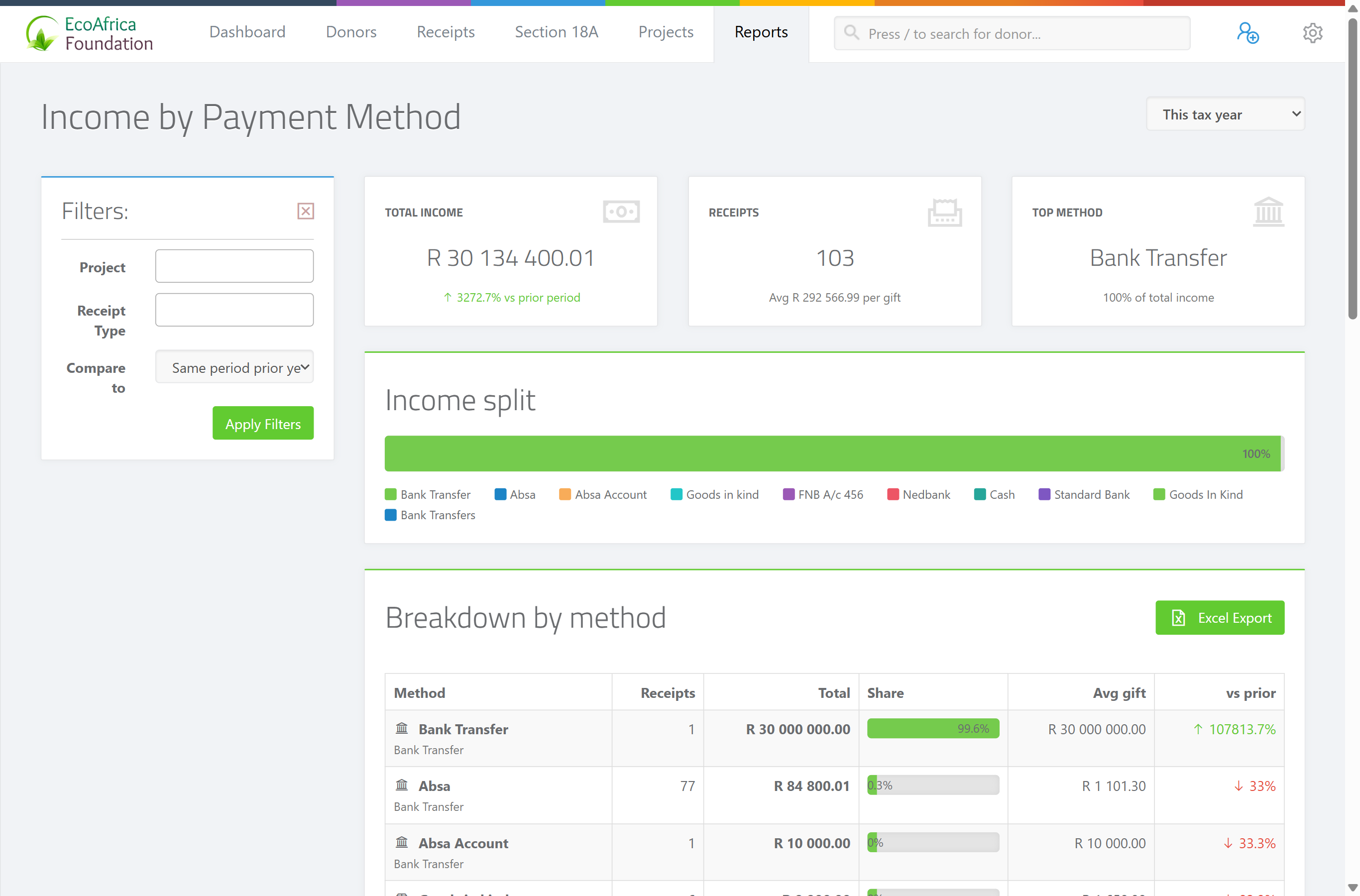
The summary cards
Three cards appear above the table:
- Total Income — the total raised across all methods in the period.
- Receipts — the number of receipts in the period.
- Top Method — the payment method that brought in the most money.
The results table
One row per payment method, with these columns:
- Method — the payment method name.
- Receipts — the number of receipts using that method.
- Total — the total amount received through that method.
- Share — that method's percentage of total income.
- Avg gift — the average gift size for that method.
- vs prior — the change against the comparison period (only meaningful when you compare to a prior year).
If there are no receipts in the selected period, the page shows: "💳 No receipts in this period."
Exporting to Excel
Use the Excel export on the page to download the breakdown as a spreadsheet. The file downloads as ad_payment_methods_report_<date>.xlsx.
How the tax year is defined
The South African tax year runs 1 March to the end of February, so the tax-year period options use those boundaries.
Field reference
| Filter | Where | Values |
|---|---|---|
| Period | Sidebar | "This tax year" (default), "Last tax year", "Two tax years ago", "This calendar year" or "Last calendar year". |
| Project | Sidebar | Limit the report to receipts allocated to a specific project. |
| Receipt Type | Sidebar | Limit to a specific receipt type. |
| Compare to | Sidebar | "Prior year" (default — same length immediately preceding, drives the vs prior column), "Same period prior year" or "No comparison". |
Common issues & solutions
| What you see | What it means | How to fix it |
|---|---|---|
| "💳 No receipts in this period." | No receipts fell in the selected period (after any project/type filters). | Choose a different Period, or clear the Project and Receipt Type filters. |
| The vs prior column is blank. | Compare to is set to "No comparison". | Set Compare to to "Prior year" or "Same period prior year". |
| A method is missing or shows zero. | That receipt method had no receipts in the period, or it isn't set up for your charity. | Check the period, and confirm the method exists — see Receipt methods (what they are and managing them). |
| The Excel export hovers/spins and won't download. | The export is still building, or the page lost its connection. | Wait a few seconds; if it doesn't finish, refresh and try again. If it keeps failing, contact support. |
FAQ
How much did I raise by EFT vs cash vs card? Open Payment methods. Each row is a method with its total, share of income and average gift.
How do I compare this year against last year? Set Compare to to "Prior year" (or "Same period prior year"). The vs prior column then shows the change.
Can I export the payment-method breakdown?
Yes — use the Excel export. The file downloads as ad_payment_methods_report_<date>.xlsx.
Why can't I pick a custom date range here? This report works in whole-year periods only. Use the Period dropdown to choose the tax or calendar year.