New donors report
In short: Open Reports, then New donors under the Donors panel. The report lists donors whose very first gift fell in the period you choose with the date range picker (top right), and shows whether they have given again. It defaults to the last 12 months. You need the View Reports permission.
Overview
The New Donors report tracks how successfully you are acquiring and retaining new supporters. The page is titled New Donors. Each row is a first-time donor, with their first gift date and amount, any further gifts since, and their total giving since becoming a donor.
Before you start
You'll need:
- The View Reports permission.
Running the report
Step 1: Open the report
Open Reports from the main navigation, then click New donors in the Donors panel.
Step 2: Choose the period
Use the date range picker at the top right (see Field reference for the named ranges). The default is the last 12 months.
Step 3: Set filters and apply
Set any sidebar filters and click Apply Filters.
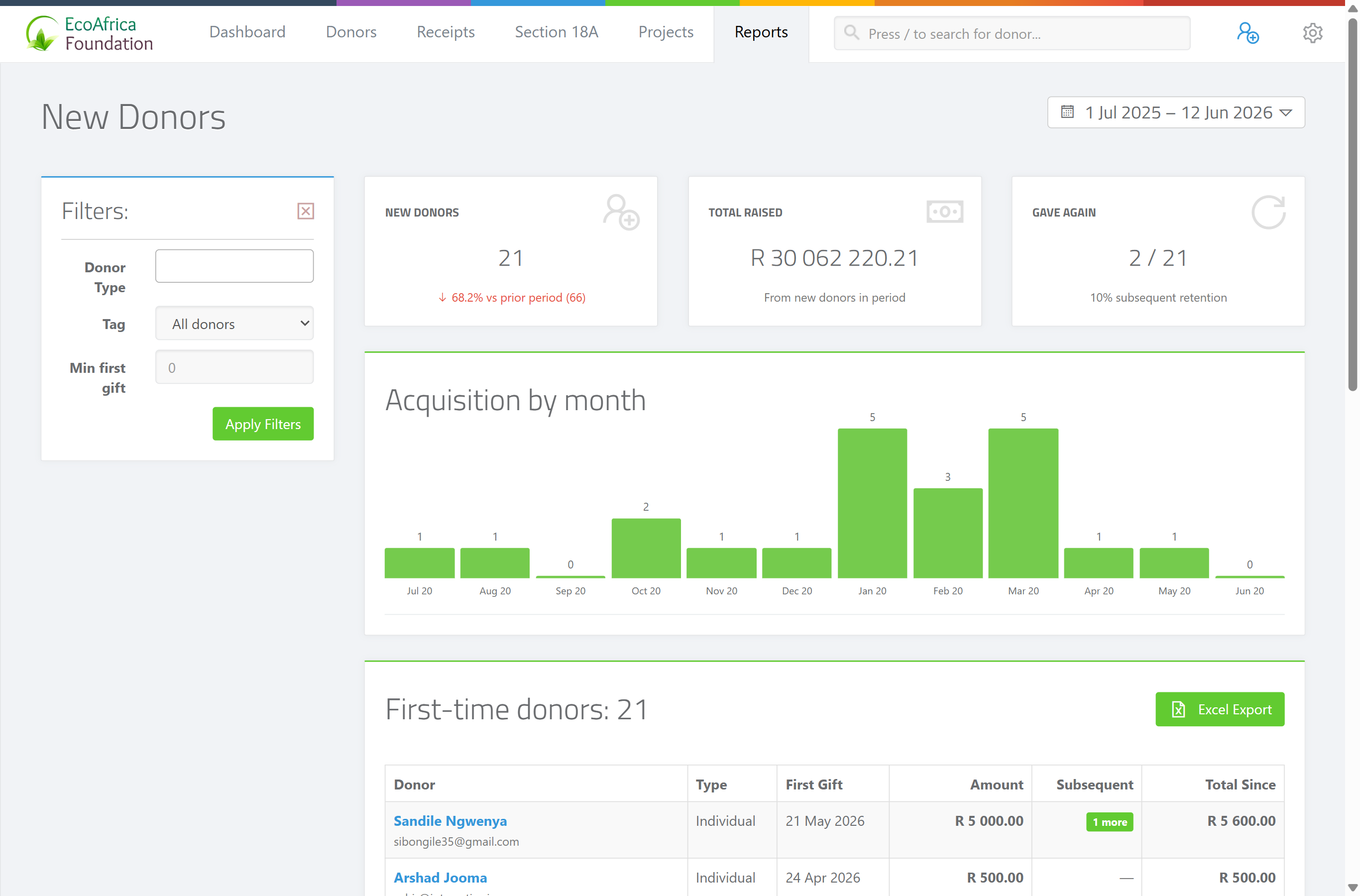
The summary cards
Three cards appear above the table:
- New Donors — the number of first-time donors in the period.
- Total Raised — the total those new donors have given since their first gift.
- Gave Again — how many of them have made a second (or later) gift.
The results table
One row per new donor, with these columns:
- Donor — the donor's name.
- Type — the donor type (for example Individual, Company, Trust).
- First Gift — the date of their first gift.
- Amount — the amount of that first gift.
- Subsequent — the value of any further gifts after the first.
- Total Since — the donor's total giving since becoming a donor.
If there are no new donors in the period, the page shows: "🌱 No new donors in this period."
Exporting to Excel
Use the Excel export on the page to download the list as a spreadsheet. The file downloads as ad_new_donors_report_<date>.xlsx.
Field reference
| Filter | Where | Values |
|---|---|---|
| Donor Type | Sidebar | Individual, Company, Company (Public), CC, NPC, Trust, Association, Estate. Leave blank for all. |
| Tag | Sidebar | Limit to donors with a particular tag. |
| Min first gift | Sidebar | Only include donors whose first gift was at least this amount. |
| Date range | Top right | Last 12 months (default), This month, Last month, Last 90 days, This calendar year, Last calendar year, This tax year, Last tax year. |
| Rows | Bottom of table | 10, 25, 50, 100 or 500 rows per page. |
Common issues & solutions
| What you see | What it means | How to fix it |
|---|---|---|
| "🌱 No new donors in this period." | No donor made their first-ever gift in the selected period. | Widen the date range, or clear the Donor Type / Tag / Min first gift filters. |
| A donor you expected isn't listed. | "New" means their first-ever gift fell in the period. A donor who gave earlier won't appear, even if they gave again in the period. | Check when the donor's first receipt was captured. |
| The Excel export hovers/spins and won't download. | The export is still building, or the page lost its connection. | Wait a few seconds; if it doesn't finish, refresh and try again. If it keeps failing, contact support. |
FAQ
How many new donors did we win this year? Open New donors and choose the period. The New Donors card shows the count.
Did our new donors give again? The Gave Again card and the Subsequent column show whether first-time donors have made further gifts.
Can I export the new donors list?
Yes — use the Excel export. The file downloads as ad_new_donors_report_<date>.xlsx.
What counts as a "new" donor? A donor whose very first receipt falls inside the selected period.